Cloudflare为其应用层(Layer 7)HTTP/HTTPS 代理(即DNS记录设置为“橙色云”代理模式时)支持一套特定的端口。这些端口允许流量通过Cloudflare的网络进行加速、缓存和安全保护。
Cloudflare 标准 HTTPS 代理端口列表
Cloudflare支持代理的 HTTPS (TLS) 端口 包括一个标准端口和多个非标准端口。您的网站若使用以下任一端口,Cloudflare即可代理该流量:
| 端口号 | 说明 | 备注 |
|---|---|---|
| 443 | HTTPS 标准端口 | 全球公认的 HTTPS 标准端口,也是 Cloudflare 缓存和中国大陆网络支持的唯一 HTTPS 端口。 |
| 2053 | 非标准端口 | Cloudflare 支持的非标准 HTTPS 端口之一。 |
| 2083 | 非标准端口 | Cloudflare 支持的非标准 HTTPS 端口之一。 |
| 2087 | 非标准端口 | Cloudflare 支持的非标准 HTTPS 端口之一。 |
| 2096 | 非标准端口 | Cloudflare 支持的非标准 HTTPS 端口之一。 |
| 8443 | 替代 HTTPS 端口 | 经常作为非标准或管理端口用于 HTTPS 服务。 |
额外的重要技术细节
1. HTTP 代理端口
为了完整性,Cloudflare 支持代理的 HTTP 端口 集合为:80, 8080, 8880, 2052, 2082, 2086, 2095。
2. 缓存和中国大陆网络限制
请注意,并非所有支持的端口都享有 Cloudflare 的全部优势:
- 缓存限制: 只有 80 (HTTP) 和 443 (HTTPS) 这两个端口支持 **Cloudflare 缓存 (Caching)**。
- 中国大陆网络限制: 对于启用了 中国大陆网络 (China Network) 的区域,只有 80 (HTTP) 和 443 (HTTPS) 端口支持 HTTP/HTTPS 代理流量。
3. 任意端口和非 HTTP 流量
如果您的服务运行在上述列表之外的端口上,或使用非 HTTP/HTTPS 协议(例如 SSH, RDP, 自定义 TCP 协议),您有以下选项:
- DNS Only (灰色云): 将该DNS记录设置为“仅限 DNS”(灰色云),流量将绕过 Cloudflare 直接连接到您的源站服务器IP,Cloudflare将不提供保护或加速。
- Cloudflare Spectrum: 对于 企业版 (Enterprise Plan) 用户,可以使用 Cloudflare Spectrum 产品来代理任意 TCP 端口(端口 21 除外),并为非 HTTP 流量提供保护和性能优化。
注意
SSL/TLS 加密模式
SSL/TLS的加密模式根据加密强度划分以下几种:
| Strict (SSL-Only Origin Pull) | 在 Cloudflare 和您的源服务器之间强制加密。使用此模式可确保与源服务器的连接始终加密,无论访问者的请求如何。 |
| Full (Strict) | 启用端到端加密并强制验证原始证书。使用 Cloudflare 的 Origin CA 为您的原始证书生成证书。 |
| Full | 启用端到端加密。当您的源服务器支持 SSL 认证但不使用有效的、公众信任的证书时,请使用此模式。 |
| Flexible | 仅在您的访客和 Cloudflare 之间启用加密。这样可以避免浏览器安全警告,但 Cloudflare 与您的源站之间的所有连接均通过 HTTP 建立。 |
| Off (not secure) | 未应用加密。关闭 SSL 会禁用 HTTPS,并导致浏览器显示警告,提示您的网站不安全。 |
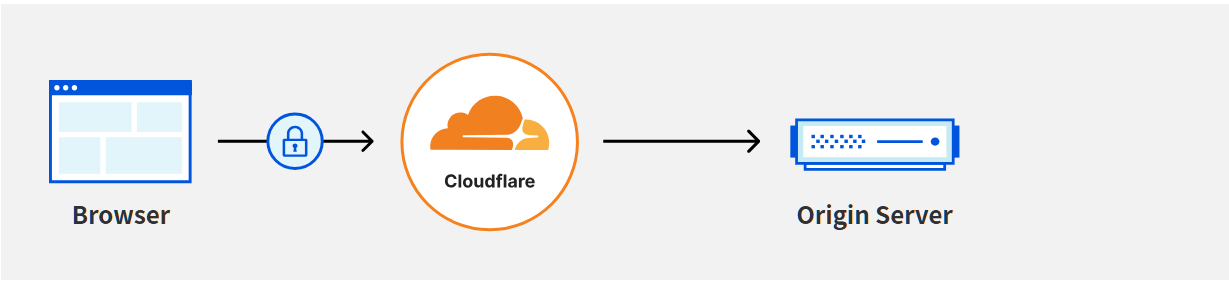
建议选择 Flexible模式(仅仅加密客户端至边缘服务器的流量,境外流量不进行加密)
这样既能保证网络畅通还能保证网络速度(相对于两端加密少一层加密,速度也就提升一点),当然,若是担心个人安全或信息泄露的话可以使用两端加密,以保证安全。SSL证书申请
在申请SSL证书之前需要在DNS中为您的VPV添加一条A记录,将其解析到您的VPS的IP地址。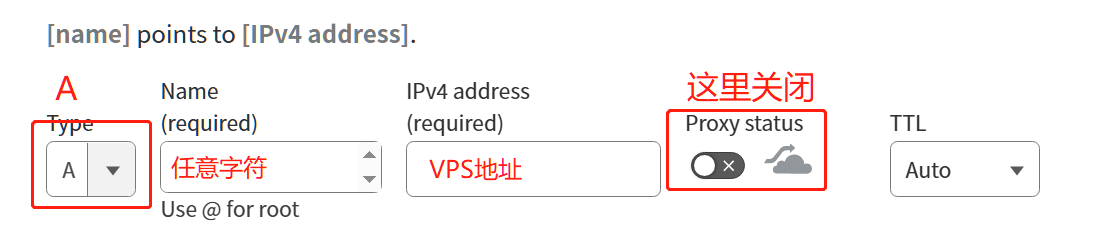
- 类型选择A,也就是添加一条A类型的DNS记录
- Name Required 指的是为您购买的二级域名添加一个三级域名
- IPV4处填入你的VPS公网地址
- proxy status 这里要把开关给关掉(暂时关掉不使用cdn,仅进行DNS解析)
假如你在Cloudflare登记的域名为abc.com,在添加该条A记录的时候你为它写了一个Name叫做cdn,并且你把你的VPS 地址填进去了,把小黄云也关闭了,最后您确认并保存了该条解析。那么此时您使用ping工具ping cdn.abc.com时就能看到你绑定的IP地址。
注意
在使用内置脚本申请SSL证书时会需要添加你的Cloudflare Global API,请点击您右上角的CF头像,找到API Tokens,进入下面的API Keys选择Global API Key输入账号密码查看并复制内容:
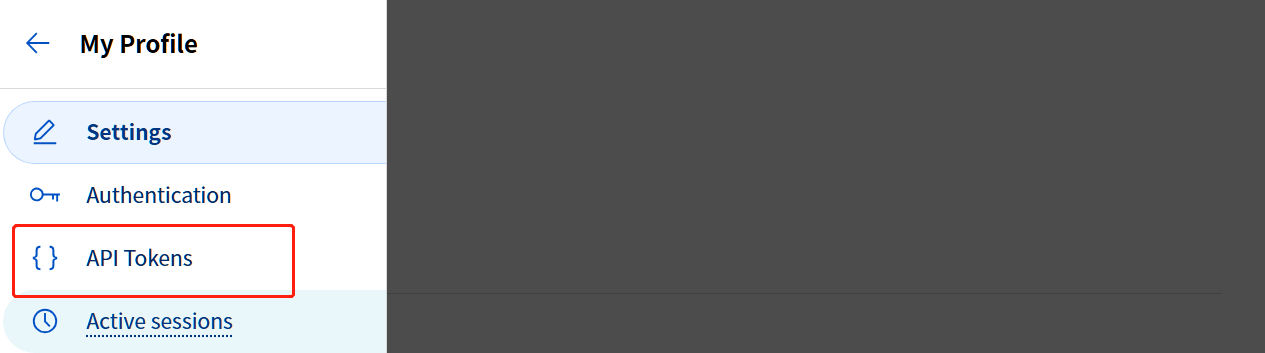

在添加DNS解析到您的VPS之后就可以在面板中(3x-ui面板)中使用自带的脚本申请Let’s Encrypt的自签SSL证书。请在服务器中复制一份申请得到的证书信息到root文件夹下备用,请注意区分私钥和公钥。
打开小黄云
此时请回到SSL/TLS加密部分将之前添加的那条DNS记录设置页面,将之前添加的解析中关闭的小黄云打开(开启CDN)。
为什么之前添加DNS记录的时候不打开小黄云?
因为打开CDN再申请SSL证书时证书供应商会将你期望的IP解析为错误的CDN IP,CDN生效意味着你的IP会被解析为CDN边缘服务器的IP,并不是你的源站IP,这也就会导致解析无效。所以必须先关闭CDN再申请证书,待证书申请完成后再重新打开CDN.